Posts

Showing posts with the label add two numbers

mathajax

Java Stream Input using BifferedReader

Add two numbers The java code add two numbers which are given as input to the code. The buffered reader object instance initialized to read the inputs from keyword. package cljavabasics; import java.io.BufferedReader; import java.io.DataInputStream; import java.io.IOException; import java.io.InputStreamReader; public class StreamInput { public static void main(String[] args) throws IOException { InputStreamReader dis = new InputStreamReader ( System.in ); BufferedReader br = new BufferedReader(dis); System.out.println( "Sum of Two Numbersn" ); System.out.println( "Enter first value" ); String arg1 =br.readLine(); int a = Integer.parseInt(arg1); System.out.println( "Enter second value" ); String arg2 =br.readLine(); int b = Integer.parseInt(arg2); int c= a+b; System.out.println( "ans : " + c ); } } Output Sum of Two Numbers Enter first value 30...
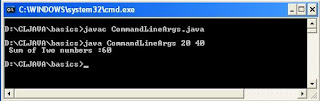
Java CommandLine Argument

Image
It explains how to read arguments from commandline and how to use it in adding two numbers program. CommandLine Argument The inputs passed along with the program execution start up command are called commandline aruguments example - java CommandArgs 10 20 java - interpreter start executing a program CommandArgs - It is program need to be executed by the interpreter. 10 20 - These are commandline arguments passed to the program. A main function of the program receives these commandline arguments as a string array parameter. CommandLine Arguments - Java program The java program reads two inputs from command line, sum it and prints the result. public class CommandArgs { public static void main(String[] args) { int a = Integer.parseInt(args[0]); int b = Integer.parseInt(args[1]); int c = a+b; System.out.println( " Sum of Two numbers :"...